
How Shoppie suggests what you’re running out of
-
Step 1 Shop as usual
Suggestions come from your finished shopping trips. After a few trips, Shoppie knows what you buy and how often.
-
Step 2 See the suggestions
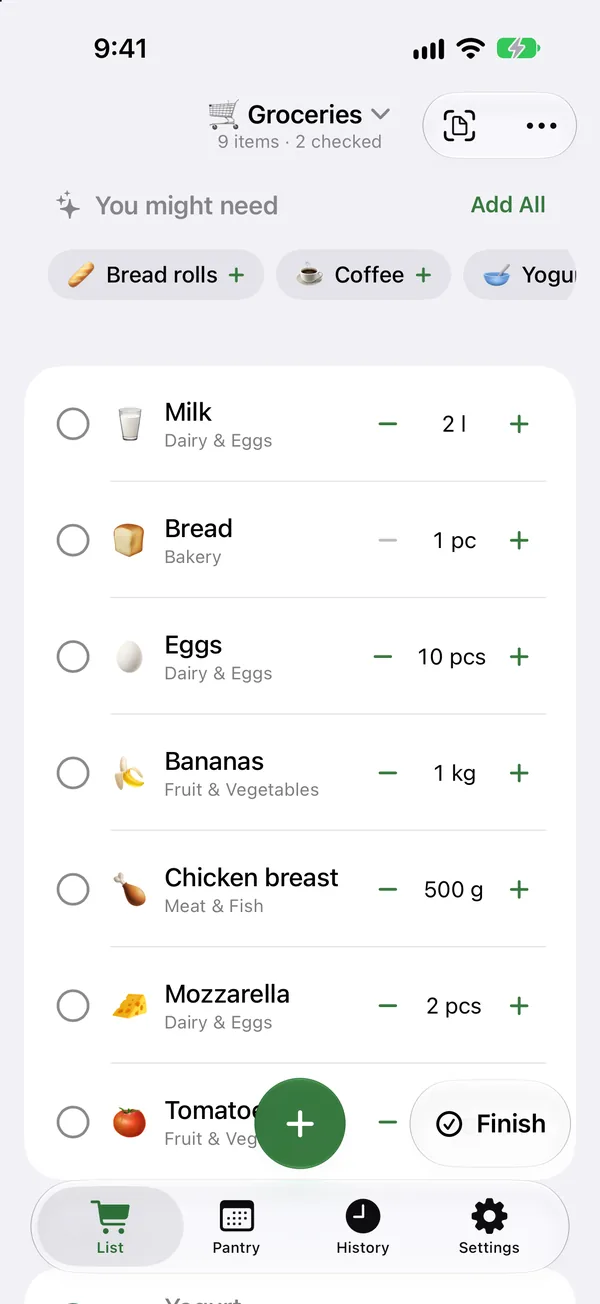
At the top of your list you’ll see “You might need” with things you’re probably running out of.
-
Step 3 Add them to your list
Tap + next to an item, or Add All to add every suggestion at once.
Frequently asked questions
Why doesn’t Shoppie suggest anything?
Suggestions need a few finished shopping trips. Shop as usual and finish each trip – suggestions will start to appear.
Does Shoppie send my shopping to a server?
No. Suggestions are calculated on your iPhone and nothing is sent anywhere.
More questions are answered on the Support page.